Android
A microphone beside your keyboard
Dictate into any app without switching keyboards.
Private Android testing is in progress. Invited testers install through Google Play.
Try the browser appVoice typing for Android, Mac and the web
SpeakSwell puts a microphone beside the keyboard you already use. Tap it, say what you mean, and clean, punctuated text lands right at your cursor, in any app.
Writing styles
SpeakSwell drops the ums, false starts and repeats, adds the punctuation, and keeps your meaning. Choose how much polish you want, or give email, messages, work chat and AI prompts each their own style.
“um so basically we’re gonna need to like push the launch to Monday because the uh the copy isn’t done yet but honestly I can’t wait to see it live”
Um, so basically we’re gonna need to, like, push the launch to Monday because the, uh, the copy isn’t done yet, but honestly I can’t wait to see it live.
Every word, exactly as you said it.
So basically we’re gonna need to push the launch to Monday because the copy isn’t done yet, but honestly, I can’t wait to see it live.
Drops fillers and false starts. Every other word stays yours.
We need to push the launch to Monday because the copy isn’t done yet. Honestly, I can’t wait to see it live.
Smooths grammar and flow without changing what you meant.
So basically we’re gonna need to push the launch to Monday because the copy isn’t done yet, but honestly, I can’t wait to see it live!
Adds a little energy where you already sound excited.
So basically we’re gonna need to push the launch to Monday because the copy isn’t done yet but honestly I can’t wait to see it live
Lighter punctuation for quick messages.

Your words
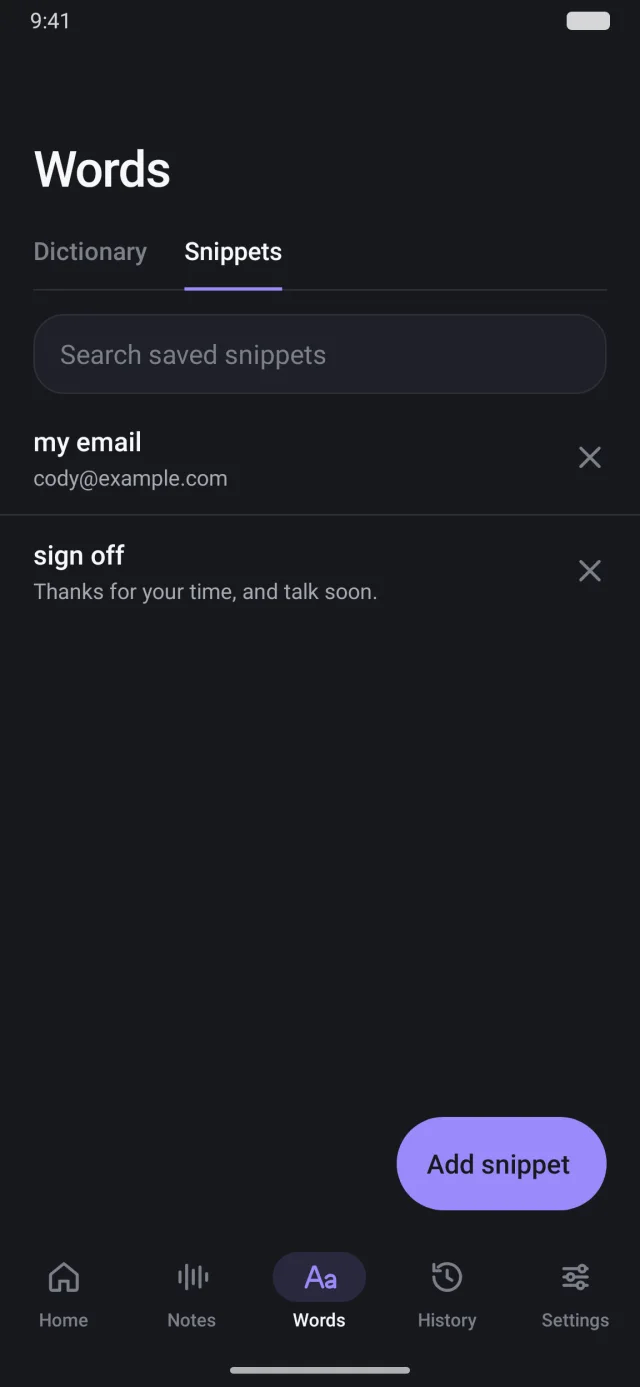
Teach SpeakSwell how to spell the people, products and terms you use. Save voice shortcuts that turn a short phrase into your email address, a sign-off or anything you type again and again.
north star
sign off
AI Notes Pro
Record a meeting, lecture or voice memo. SpeakSwell transcribes while you listen, then writes up the action items, decisions and open questions, each linked to the moment it was said.
A SpeakSwell summary of a 42-minute meeting with action items, a decision, an Email follow-up button, and an answer to the question “When does the launch happen?” linked to the moment it was said.
Made for real life
SpeakSwell adds a microphone beside it. Tap to talk, or hold it like a walkie-talkie.
If a transcription can’t finish, the recording stays on your phone, ready to retry.
Dictate for up to an hour at a time, even after the screen turns off.
Press ⌥ Space in any app, speak, and your words land at the cursor.
Optional Context Assist reads the conversation on screen to get names and formatting right.
It records only when you tap, never appears in password fields, and your audio isn’t kept on our servers.
How it works
Your 2 free hours a month start right away. No key to paste, nothing to configure.
Allow the microphone and Accessibility once. SpeakSwell shows you each switch.
Open any text field, tap the microphone beside your keyboard, speak, and tap to finish.
Get SpeakSwell
Sign in with the same Google account on Android, Mac and the web. Your plan and allowance come with you.
Android
Dictate into any app without switching keyboards.
Private Android testing is in progress. Invited testers install through Google Play.
Try the browser appMac
Press ⌥ Space to dictate in any app, and take AI notes on your calls.
macOS 13 or later · Apple silicon and IntelUnzip SpeakSwell, move it to Applications, then open Settings and sign in.
This preview is locally signed, not Apple-notarized. If macOS blocks the first launch, follow the Mac setup guide. Release checksum
iPhone & browser
Record in your browser, then copy the text into any app.
Any modern browser · Internet requiredIn Safari, open the web app, then choose Share → Add to Home Screen. It records and copies text; it doesn’t replace your iPhone keyboard. iPhone setup guide
Pricing
$0
2 hours of dictation every month
$7.99/month
or $59.99 a year, about $5 a month
Compare plans in detailPrices in US dollars. Subscriptions renew until cancelled.
Questions
No. On Android, keep the keyboard you already use. The SpeakSwell microphone appears beside it whenever you’re typing in a text field.
Most apps with a text field: messages, email, notes, browsers and work chat. A few apps and protected fields don’t allow text to be inserted; when that happens, your dictation waits in History to copy.
Only after you tap or hold the microphone. You can cancel any recording, and SpeakSwell never sends a message for you.
Audio is sent securely to be transcribed and isn’t saved on SpeakSwell’s servers. Your Android history stays on your phone. The web app saves your text to your account, and the Mac app can too when you turn it on. Context Assist stays off until you choose it. Read the privacy policy.
Use the web app on iPhone: record, then copy your text into any app. Add it to your Home Screen for one-tap access.
Dictation needs an internet connection. If you lose signal, your recording is kept so you can retry it.
Free for 2 hours of dictation every month. No card needed.